Unify Your
Calendar Life
CalUnity is a unified calendar app for Google, Microsoft, Apple and CalDAV. One AI-assisted interface across iOS, Android and the web. Read-only by default, privacy-first, free.
Loading preview...
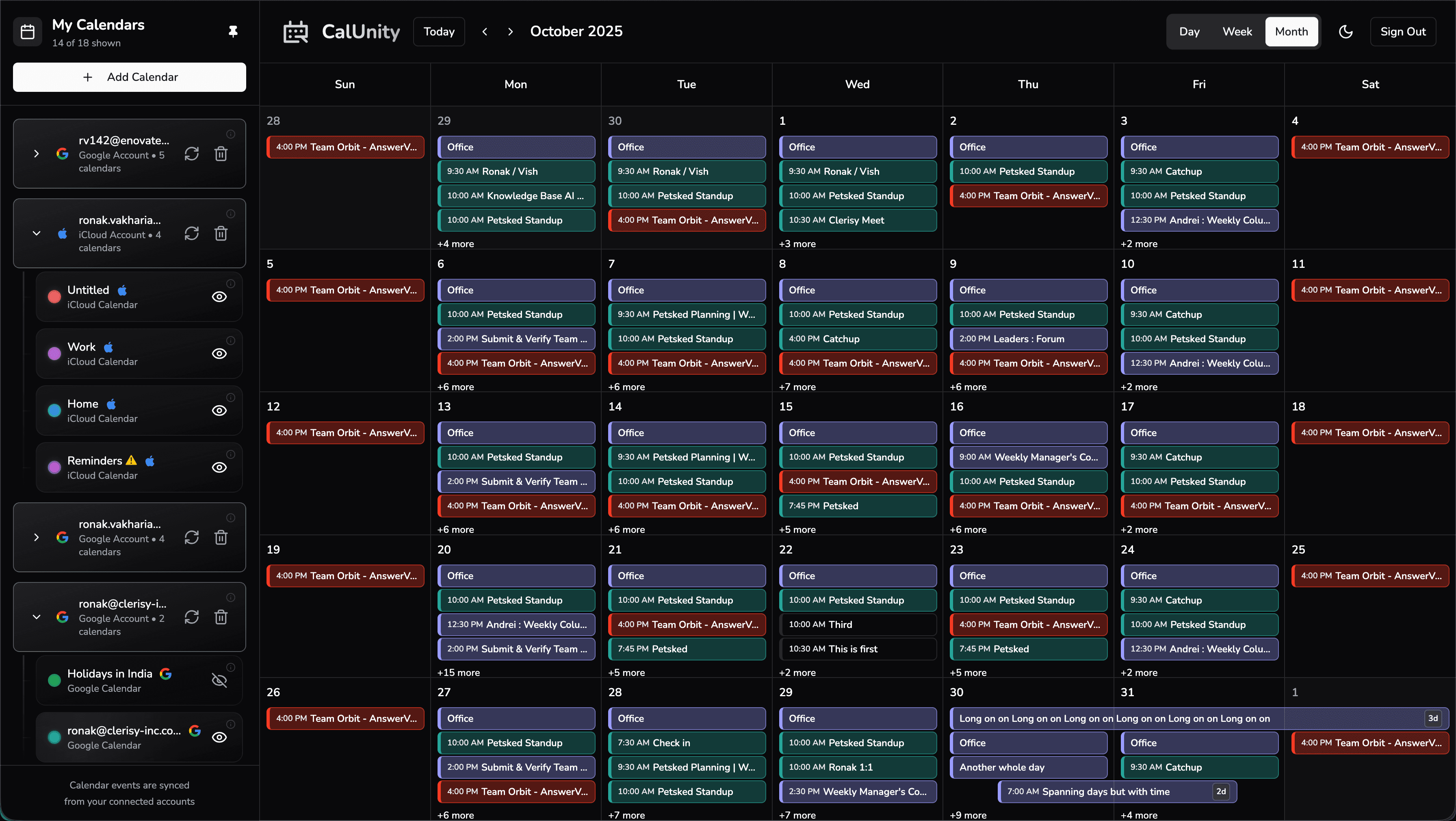
Your Month, Perfectly Organized
Any Login.
Access all Your Calendars.
Our intelligent account linking recognizes when you sign in with any provider and automatically loads all your connected calendars. No manual linking. No confusion. Just seamless access.
Sign in with Any Account
Choose Google, Microsoft, Apple or CalDAV
Automatic Recognition
We detect all your linked accounts instantly
Unified View
See all calendars in one beautiful interface
SUPPORTED PROVIDERS
Your AI Powered
Calendar Assistant
CalUnity's AI understands your schedule, helps you plan smarter and keeps you in control. Ask anything about your calendar in plain English, no buttons, no menus, just conversation.
Natural Language Control
"Schedule lunch with Sarah next Tuesday at noon", just type what you want and AI handles the rest.
Talk to your calendar like a personSmart Insights
AI analyzes your patterns and gives you a clear picture of how your time is spent across all calendars.
Understand your time like never beforeConflict Detection
AI spots overlapping events, tight gaps between meetings and suggests the best way to resolve conflicts.
Never double-book againYou Stay in Control
AI never modifies your calendar without asking. Every action requires your explicit approval first.
Zero changes without your permissionYour Data.
Your Rules.
We built CalUnity with a simple principle: your calendar data belongs to you. We don't sell it, we don't mine it and we never touch your calendars without your say-so.
Read-Only by Default
We never write to your calendars unless you explicitly grant write permission.
Calendars Stay Separate
Events live in their origin calendar. No cross-account copies, no clutter, no duplicates.
Encrypted & Secure
All data is encrypted in transit and at rest. Your tokens are securely stored.
Full Transparency
See exactly what data we access. Revoke permissions anytime with one click.
No Data Selling
Your calendar data is never sold, shared with advertisers or used for profiling.
How CalUnity Compares
Side-by-side with the most popular calendar apps: Morgen, Fantastical, OneCal and Notion Calendar. All features verified as of May 2026.
| Feature | CalUnity | Morgen | Fantastical | OneCal | Notion Cal |
|---|---|---|---|---|---|
| Google Calendar | |||||
| Microsoft Outlook / 365 | |||||
| Apple iCloud | |||||
| Generic CalDAV | |||||
| iOS native app | |||||
| Android native app | |||||
| Web app | |||||
| Free to use | Fully free | Limited free tier | Limited free tier | ||
| AI assistant | Included | Paid add-on | Limited | ||
| Read-only by default | |||||
| Keeps calendars separate (no cross-sync clutter) | |||||
| Independent product |
CalUnity is the only fully-free unified calendar app with a native Android app, support for all four major providers (Google, Microsoft, Apple iCloud and CalDAV), and a built-in AI assistant included at no cost. Read-only by default keeps your data safe, and CalUnity is an independent product, not part of a larger productivity suite.
Download Our Apps
Available on iOS and Android for the best mobile experience
Frequently Asked Questions
Which calendar providers does CalUnity support?
How does the AI calendar assistant work?
Is my calendar data private and secure?
Are there mobile apps available?
Is CalUnity free to use?
How do I link multiple calendar accounts?
Does CalUnity sync events between my calendars?
Ready to Unify Your Calendar?
Free forever. No credit card required. Available on iOS, Android and the web.